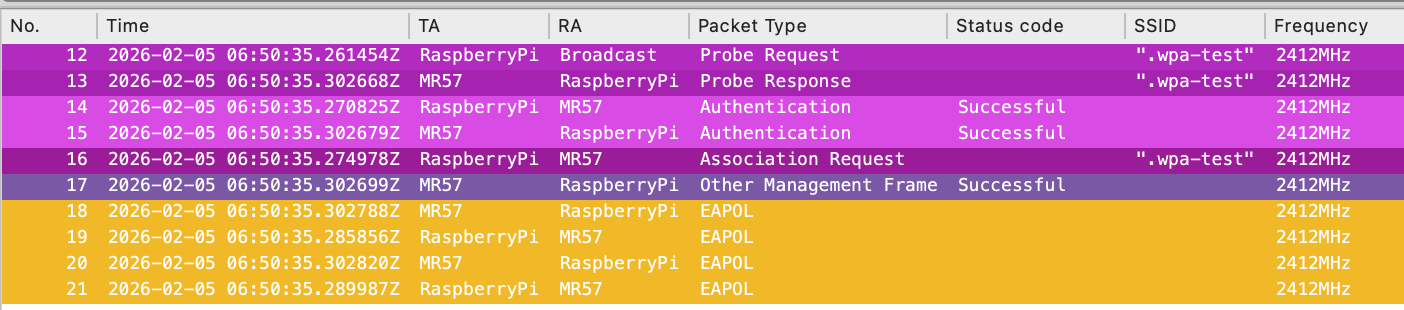
I frequently encounter cases where clients experience issues with WPA3, but the problem is almost always resolved by reverting the setting to WPA2. There are multiple types of configurations to consider, and the difference between WPA-Personal and WPA-Enterprise is an important factor.
I would like to highlight a recent case I handled as an example of specific client behavior, along with my test in the lab.
Reported issue:
A customer’s device was attempting to associate with an SSID configured for WPA3-Personal Transition Mode on the 2.4GHz using Meraki AP, but it failed.
For 802.11w (MFP), the Meraki dashboard still provides options to choose Enabled or Required. In this case, Enabled is the correct one as it allows unsupported clients to connect.
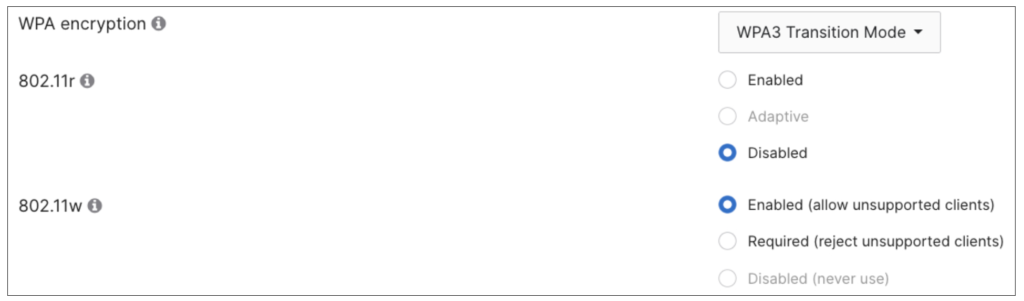
Transition Mode is intended to allow non-WPA3 clients to connect while still supporting WPA3-capable clients. Also, in this instance, the issue appeared to be limited to this specific device.
PCAP Analysis:
While looking at the provided wireless PCAP, interestingly, it seems that the AP is the one rejecting the association response with status code 31 (0x001f), stating “Robust management frame policy violation.”
The client kept trying to associate with the SSID, but it never succeeded as below.
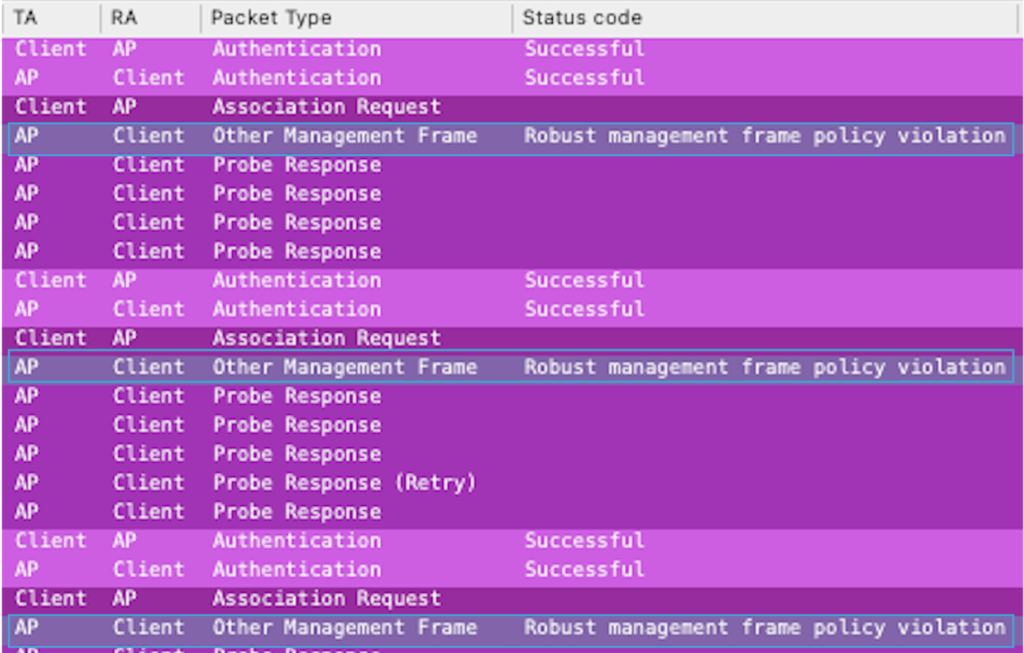
I had never seen this status code before. I checked online like this link, but I was not able to find many details. I thought 802.11w might be related to the issue at this stage.
Upon further inspection of the AP’s Probe Response, the RSN IE appeared correct; the MFPR (Required) flag was not set, while the MFPC (Capable) flag was set as configured. The AP advertised three AKM types, including SAE (SHA256) for WPA3-supporting clients.

From what I understood, in WPA3 transition mode, the AP provides type 2 PSK in the AKM so that WPA3 unsupporting clients still can connect on 2.4GHz or 5GHz.
For 6GHz connection, WPA3 is mandatory, so this would not be the case there.
Another Interesting observation is that, in the client’s association request, both the MFPR and MFPC flags were unset (which is expected), yet the client still included SAE types in its AKM list.
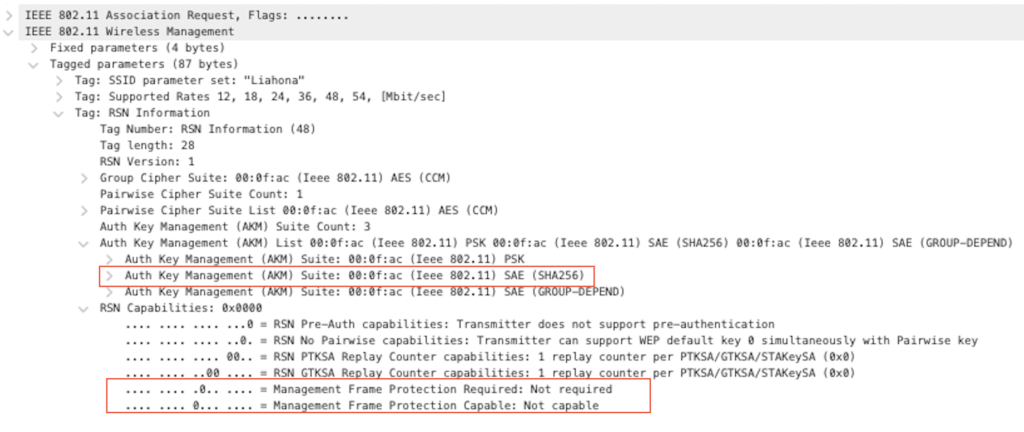
For SAE, MFP must always be supported, so this contradiction (requesting SAE while indicating no MFP capability) seems to trigger the status code 31 violation. This suggests the issue is related to the client-side behavior.
Lab Testing:
Since I didn’t have the same device for testing, I used my Raspberry Pi instead, which doesn’t support MFP, to see if I could observe a working scenario and confirm the expected details.
When I used my MR57 as the AP and tried to connect the client, it was able to see the SSID and then successfully connected on 2.4GHz.

By comparing the association requests, my Raspberry Pi correctly showed that it did not support MFP (MFPC flags unset) and it only included AKM Type 2 (PSK). Consequently, the AP responded with status code 0 (successful), and the device associated normally.

When I changed 802.11w to ‘Required’ in the UI, the Raspberry Pi was no longer able to connect (this was also expected). The AP now included the MFPR flag, so the client no longer responded after receiving the probe response and remained silent.

Summary:
This is one example case of a WPA3-related compatibility issue with WPA-Personal. While WPA3-Enterprise may present different challenges, especially since it does not rely on SAE and may have different compatibility across various devices and operating systems.
Therefore, verifying the expected behavior based on specific settings and observing how the client and AP interact is essential to understanding the root cause of these failures.
Thank you for reading through this post. I hope this helps.

Comments